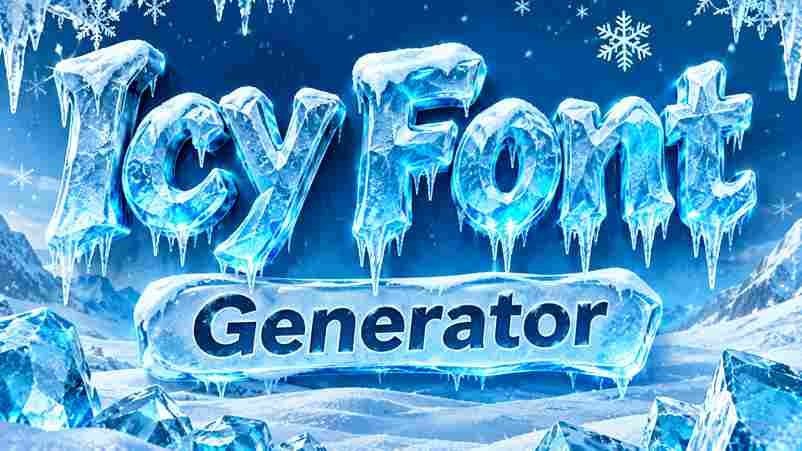
Icy Font Generator
Turn ordinary words into cool, frozen-looking text. Choose an icy style, customize your effects, and download your design.
Design tip: Short words and names often look especially good with icy effects. Try uppercase text for a bold frozen logo-style appearance.
Important: Copy Text copies the original characters. Download PNG preserves the complete icy visual effect for use in designs, profiles, and graphics.
An Icy Font Generator turns ordinary wording into a Frozen Ice font style with sharp edge facets, deep internal frost cracks, and icicle drips, creating a photorealistic typography effect in seconds for winter designs.
Rather than installing a typeface, users can test a custom prompt, preview frozen water quality, and export transparent PNG artwork for logos, Instagram posts, winter stories, or seasonal campaigns without specialist software or design skills.
Table of Contents
What Is An Icy Font Generator?
An Ice Font Generator uses AI to turn names into frost text effects, shaping solid ice letters with arctic crystal letterforms, sharp edge facets, and deep internal frost cracks for convincing results on digital designs.
It is not always a downloadable font: some tools output fancy Unicode characters for copy and paste, while others create PNG artwork with icicle drips and a Transparent Effect for polished graphics or social posts.
Ice Fonts In Different Fonts
For Ice fonts, different fonts create distinct directions: from bold blocks and gothic lettering to cursive, italic, monospace, and curly forms. This Ice style reshapes Frozen Ice typography across text effects and visual treatments online.
Crystal facets, internal frost crack network, icicles point down, and a pale blue-white tint distinguish variations; Glass or Chrome Metal finishes feel sharper, while cute and medieval treatments suit seasonal branding needs across digital platforms.
Also Read : Nobita Stylish Name: 500+ Cool, Cute & Unique Names
How To Create Ice Text
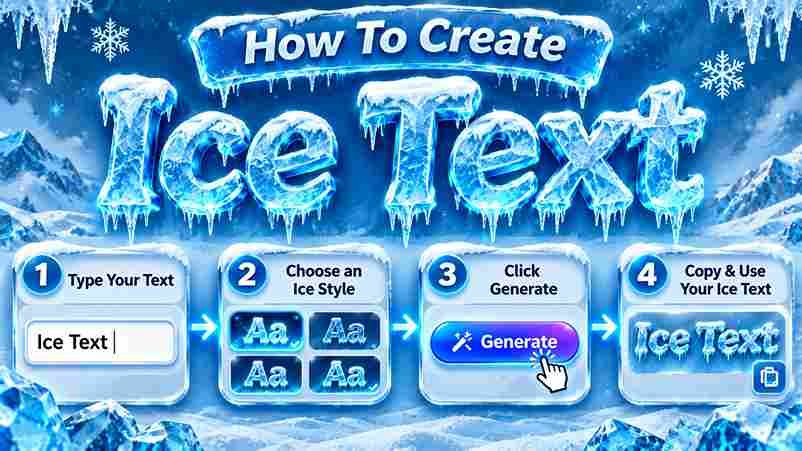
Start by entering a short word in the input box, then choose an Ice style that suits its purpose. Try 3D Ice, Ice Crystal, or Drip Ice before refining details for a clearer preview first.
Adjust the bold or italic treatment, test a Glass Clear finish, and compare Frozen Ice against Blue Soak. Generate the result, inspect edges, then save a free PNG download for sharing across your preferred platforms.
Use Cases
Apply an icy text effect to gaming titles, social media graphics, winter promotions, Christmas posters, and holiday invitations; snowflakes, icicles, and a decorative glow can make event artwork feel instantly recognizable online at a glance.
For polished client work, prepare a frosted glass logo, neon outline display, or liquid glass poster in Canva or Figma; check font licenses before applying exports to commercial products, and share sample designs for approval.
Similar Text Effect Styles
Similar styles can refresh an icy design without losing its wintry identity. A blue glow font adds soft illumination, while an Ice Crystal Font creates crisp facets and sharper edges for a colder identity overall.
Use frosty text for a restrained finish; choose a Frozen Letter Effect when individual characters need depth, cracked details, and dimensional highlights across album covers or Winter Social Content, without overcrowding the main title design.
Why Choose
Choose icy lettering when a design needs more than decoration alone: Frozen Text Effect adds photorealistic frozen water quality, while crystalline facets and white-blue tint create depth without requiring full winter scenes or elaborate staging.
It also suits winter esports branding, movie poster type, and seasonal TikTok graphics; its cold premium tech mood can distinguish campaigns, while copy-and-paste options keep quick profile styling practical across gaming and major social platforms.
Also Read : Hassan Stylish Name – 100+ Cool, Fancy & Unique Names
The Story Behind Frozen Ice: The Visual DNA
Frozen water is the starting point: water expanding under pressure leaves irregular fracture planes; surface angle, geometric planes, and smooth curves give each icy letter a cut crystal profile and a natural finish without ornament.
At thin edges, glacial ice appears nearly clear; thicker areas show blue as red wavelengths fade. Stress fractures and fine internal cracks form a network with trapped air, creating white branching lines inside each letter.
Sharp Edge Facets
Sharp facets give solid ice its crystalline identity, where each Ice Shard catches light differently. In an Icy Font, angled planes reveal visual evidence of Fracture across the material, creating layered detail in each letterform.
Rather than smoothing contours, Spiky corners and Broken Glass cuts give the thick frozen block a deliberate edge. These Shapes add stunning text effects, while spacing keeps words readable on mobile layouts and promotional headers.
Internal Frost Crack Network
An icy surface gains realism when water dripped into narrow seams and refroze; each new layer freezes into branching fractures. This subtle physics responds to changing temperature, shaping letters with precision and realistic depth variation.
Deep ice and glaciers develop stress lines differently; a convincing frozen glass type effect can echo frozen rivers without copying them. Apply restrained Eroded texture and Water highlights; keep fractures fine, directional, and uncluttered overall.
Icicle Drip Terminals
Dripping terminals give an Icy Font its signature finish: slim frozen extensions descend from selected letter edges, creating the Ice Text Effect without covering the character’s main silhouette or reducing legibility at typical display sizes.
At display scale, tapered ends add visual effects to titles, game labels, and artwork; at small sizes, excessive drops merge into noise. Preview each variation against its final background before downloading the finished image file.
Pale White-Blue Tint
A pale white-blue tint can soften icy lettering without weakening its frozen character. I use this restrained palette when glass styles need clarity, subtle polish, and a believable environmental quality rather than neon color effects.
Against dark backgrounds, the tint remains readable because its raw highlights suggest ice caves, while measured contrast keeps small letters practical across modern UI layouts and compact profile graphics for everyday screen viewing on phones.
Also Read : Ayesha Stylish Name: 1000+ Cute, Fancy, Unique & Trending Names
The Mood
The visual DNA of this style works when the aesthetic stays controlled: arctic chill, pale highlights, and Snow details give letters a winter presence, while Cool spacing protects readability across screens and profile graphics alike.
Rather than relying on spectacle, pair ambient depth with chillwave color cues and cold worlds imagery; a famous blue color accent can feel Fresh and aesthetic without making lettering theatrical for most modern profile designs.
Frozen Ice Text Effect Gallery
A gallery should compare the Frozen Ice text effect across Frost Display, Deer Snow Regular, and Ice & Snow samples; distinctive silhouettes become clearer when every preview shares an aesthetic reference, scale, and background contrast.
An AI-generated board can pair first snow with Snowy or Hologram variants; use the style library to judge emotional register for Winter Film Titles and winter sports events at thumbnail scale before final client selection.
Free Fonts By License
Free fonts are not governed by one universal permission: some are personal use free, while others allow broader projects. Before using a font file, read its font licensing terms and identify permitted uses before publishing.
A TTF or OTF file may be free to download, yet still restrict merchandise, client work, or advertising. Claims like 100% Copyright-Free or no font license needed require checking the creator’s actual terms carefully first.
Also Read : Unicode Characters
Conclusion
An effective icy design brings frozen ice character into practical branding, turning a short punchy text or title into crisp Frozen Ice font artwork for winter events, game screens, and Cold Brand Identity campaigns today.
For flexible publishing, test Unicode text for copy-and-paste use, or choose an image effect when layered detail matters; export transparent PNG artwork, then check readability, compatibility, and contrast across different screen sizes consistently before sharing.
What Is an Icy Font Generator?
An Icy Font Generator turns ordinary wording into a frozen ice text effect with frosty edges, pale blue tones, and crystalline details. Create eye-catching titles for winter graphics, gaming designs, or seasonal social media posts.
Is the Icy Font Generator Free to Use?
Yes, this free text generator lets you create icy lettering without design software or complicated steps. Enter your phrase, choose the Frozen Ice style, preview the result, and download your finished design for personal projects.
What Text Works Best With the Frozen Ice Style?
Short words, names, and bold phrases usually work best with the Frozen Ice style because sharp letter shapes remain easy to recognize. Try uppercase titles or simple wording to make frosty details stand out clearly.
What Can I Use Icy Fonts For, and Which Format Should I Download?
You can use icy lettering for winter merch, ski resort promotions, game titles, music artwork, or seasonal campaigns. Choose a suitable download format, such as PNG for transparency or JPG for solid backgrounds and easy sharing.
Are Icy Fonts Copy-and-Paste Unicode or Image Effects?
Detailed icy effects are generally image designs, while simple decorative characters may be Unicode. Check the output before sharing: images keep frost textures, but screen readers may not interpret lettering across platforms without descriptive alt text.
3 thoughts on “Icy Font Generator – Create Cool Frozen Text Styles”